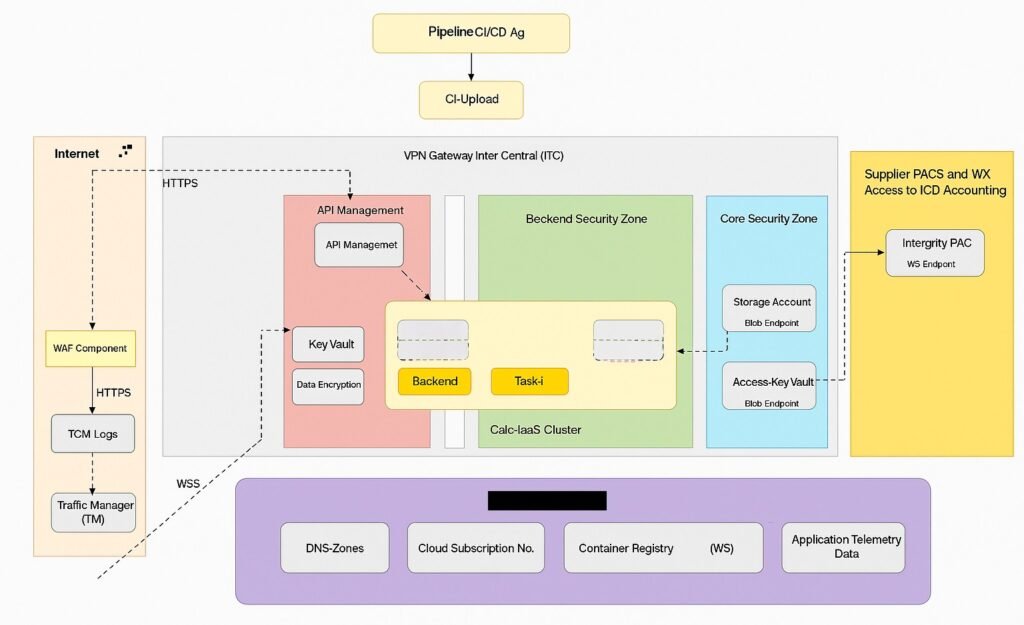
User Initiates Request
- A user sends a request from a browser or mobile app to a public URL (e.g.,
https://butterflymart.com).
DNS Resolution
- The domain name is resolved via DNS Zone to an IP address.
- The request is routed to the Traffic Manager (TM).
1. Internet Entry Point
The user initiates a request from a browser or app.
- This request first hits the Internet-facing layer of your infrastructure.
WAF Component
- The request goes through the Web Application Firewall (WAF):
- Filters malicious traffic (e.g., SQL injection, XSS).
- Logs traffic in TCM Logs for monitoring and auditing.
- Routes clean traffic to the Traffic Manager (TM).
3. Traffic Manager (TM)
- TM handles load balancing and geo-routing.
- It decides which region or endpoint should handle the request.
- Sends the request to the appropriate zone via the VPN Gateway Inter Central (ITC).
Traffic Manager performs
Geo-routing: Directs users to the nearest or healthiest region.
Load balancing across multiple endpoints (regions or zones).
Application Gateway
- Application Gateway acts as a Layer 7 (HTTP/HTTPS) load balancer.
- It performs:
- SSL termination
- Path-based routing
- Web Application Firewall (WAF) integration
- It inspects the request and routes it to the appropriate AKS ingress controller (e.g., NGINX or Traefik).
5. AKS (Azure Kubernetes Service)
- The request enters the AKS cluster:
- Hits the Ingress Controller.
- Routed to the correct microservice pod based on path or hostname.
- Services may include:
- Product Service
- User Service
- Order Service
- etc.
6. Internal Service Communication
- Microservices may call other services internally.
- Communication is secured via:
- Service Mesh (e.g., Istio)
- Private DNS
- Network Policies
7. Data Access Layer
- Services access data from:
- Databases (SQL/NoSQL)
- Storage Accounts (Blob/File)
- Key Vaults (for secrets and credentials)
- Data is encrypted using Data Encryption Services.
8. Response Construction
- The microservice constructs the response.
- It returns the response via:
- AKS → Application Gateway → Traffic Manager → Internet → User
9. CI/CD Pipeline (DevOps Integration)
- Code is deployed via:
- CI/CD Agents (e.g., GitHub Actions, Azure DevOps)
- Container Registry stores Docker images.
- AKS pulls updated images during deployment.
10. Monitoring & Telemetry
- Application performance and logs are tracked using:
- Application Insights
- Telemetry Data
- Log Analytics
- TCM Logs (Traffic Control Monitoring)
Leave a Reply