What is the most basic deployment unit in Kubernetes?
A: In Kubernetes, the most basic unit of deployment is a Pod. While Docker deals directly with containers, Kubernetes introduces the concept of Pods as a wrapper around containers. A Pod can contain one or multiple containers, though most commonly it contains a single container.
Why does Kubernetes use Pods instead of directly managing containers?
A: Kubernetes uses Pods for several important reasons:
- Declarative approach: Instead of running imperative commands like
docker runwith multiple arguments, Kubernetes uses YAML files to declare the desired state. - Standardization: Pods provide a consistent way to define all aspects of container deployment in a standardized format.
- Group related containers: Multiple containers that need to work closely together can be placed in the same Pod.
- Resource sharing: Containers in the same Pod share:
- Network namespace (can communicate via localhost)
- Storage volumes
- IP address (the Pod gets the IP, not individual containers)
- Management abstraction: Pods provide a higher-level abstraction that enables Kubernetes features like auto-healing and auto-scaling.
How do Pod YAML files compare to Docker commands?
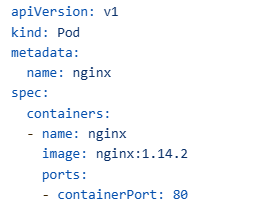
A: A Pod YAML file is essentially a declarative version of a Docker run command. For example:
Docker command:
docker run -d --name nginx nginx:1.14.2 -p 80:80Equivalent Pod YAML:
How do I set up a local Kubernetes environment?
A: Setting up a local Kubernetes environment involves three main steps:
- Install kubectl – The Kubernetes command-line tool:
For Linux
curl -LO “https://dl.k8s.io/release/$(curl -L -s https://dl.k8s.io/release/stable.txt)/bin/linux/amd64/kubectl”
chmod +x kubectl
sudo mv kubectl /usr/local/bin/
Install Minikube – A tool for running a single-node Kubernetes cluster locally:
For Linux
curl -LO https://storage.googleapis.com/minikube/releases/latest/minikube-linux-amd64
sudo install minikube-linux-amd64 /usr/local/bin/minikube
Start a Minikube cluster:
Start a Minikube cluster:
minikube start
For more resources
minikube start –memory 4096 –driver=hyperkit
How do I check the status and logs of my Pod?
Kubernetes provides several commands for checking Pod status and logs:
- Check Pod status:
kubectl get pods
Get detailed information about a Pod:
kubectl describe pod nginxThis shows events, conditions, and status information that’s crucial for troubleshooting.
View Pod logs:
kubectl logs nginx
Delete a Pod:
kubectl delete pod nginx
Container vs Pod vs Deployment
- Container: A basic unit that runs on container platforms like Docker with configuration specified via command-line parameters
- Pod: Kubernetes’ smallest unit that runs one or more containers, specified via YAML manifests
- Deployment: A higher-level Kubernetes resource that manages pods through ReplicaSets, enabling auto-healing and auto-scaling
How Deployments Work
- You create a Deployment resource with desired specifications (replicas, image, etc.)
- Deployment creates a ReplicaSet controller
- ReplicaSet ensures the desired number of pods are always running
Benefits of Deployments
- Auto-healing: If a pod fails or is deleted, the ReplicaSet automatically creates a new one
- Zero-downtime deployments: When scaling or updating, it ensures application availability
- Declarative configuration: Define your desired state in YAML and Kubernetes maintains it
If pods can run containers, why do we need deployments?
A: Pods alone don’t provide the enterprise features that make Kubernetes valuable:
- If a pod is deleted or fails, it stays deleted/failed
- Scaling requires manually creating multiple identical pods
- Updating pod definitions requires deleting and recreating pods (causing downtime)
Deployments solve these problems through ReplicaSets, providing auto-healing, easy scaling, and zero-downtime updates.
How does auto-healing work in practice?
A: Let’s see the difference between pods and deployments in action:
- With direct pod creation:bash
kubectl apply -f pod.yaml kubectl delete pod nginx # Pod is deleted and stays deleted - With deployment:bash
kubectl apply -f deployment.yaml kubectl delete pod nginx-deployment-7b9b8d8f45-x2jvp # Pod is terminated, but ReplicaSet immediately creates a new one
You can observe this behavior in real-time with:
bash
kubectl get pods -w # Watch for changes
When a pod managed by a deployment is deleted, you’ll see:
- The pod enters “Terminating” state
- Simultaneously, a new pod appears in “ContainerCreating” state
- The new pod becomes “Running” before or as the old pod completes termination
This ensures zero downtime for your application.
Best Practices for Deployments
- Always use deployments instead of bare pods for production applications
- Store deployment manifests in version control for tracking changes and enabling GitOps workflows
- Use descriptive labels to organize and select your resources effectively
- Set resource requests and limits in your pod templates to ensure proper scheduling and prevent resource starvation
- Implement health checks (liveness and readiness probes) to improve the reliability of your applications
- Use rolling update strategy (the default) for zero-downtime deployments
What is a namespace in Kubernetes?
Answer:
A namespace in Kubernetes provides logical isolation for resources within a cluster.
- Multiple project teams can share a cluster but have isolated environments through namespaces.
- Enables RBAC (role-based access control), network policies, and separation of resources.
- Developers in different namespaces cannot access each other’s resources unless granted permission.
What is the role of kube-proxy?
Answer:
Kube-proxy configures network rules on nodes, enabling communication between services and pods.
- Manages routing using Linux IP tables or IPVS.
- Handles traffic for services (e.g., NodePort) so that requests to NodeIP:Port are routed to the correct Pod.
- Responsible for distributing requests according to service definitions.
What are the main differences between Docker Swarm and Kubernetes?
- Popularity: Kubernetes has broader adoption and community support.
- Use case: Kubernetes suits enterprise and mid-scale organizations, Docker Swarm for small/simple apps.
- Scalability & Networking: Kubernetes supports advanced networking and third-party integrations (e.g., Flannel, Calico), Swarm has limited options.
- Extensibility: Kubernetes supports custom resources and controllers; Swarm has limited extensibility.
- Market Demand: Kubernetes skills are in higher demand in DevOps jobs.
What is the role of kubelet?
Kubelet is the agent running on each node responsible for managing pod lifecycle.
- Ensures specified number of pods are running.
- Monitors pod health and reports to API server.
- Restarts pods if they fail, triggers scaling as needed.
What are your day-to-day activities on Kubernetes?
As a DevOps engineer:
- Manage and maintain Kubernetes clusters (upgrades, patching).
- Deploy and troubleshoot applications, monitor health of clusters and workloads.
- Resolve issues related to pods, services, and networking.
- Perform maintenance tasks such as node upgrades, security checks, and package installations.
- Collaborate with developers and act as Kubernetes subject matter expert, handle tickets/issues, and support onboarding of new projects.
Leave a Reply