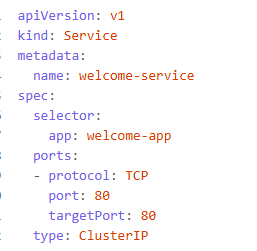
apiVersion: v1
- What it does: Specifies the API version for the Service object.
- Why it’s used:
v1is the stable version for core Kubernetes resources like Services, Pods, and ConfigMaps.
🔹 kind: Service
- What it does: Declares the type of Kubernetes object.
- Why it’s used: A
Serviceprovides a stable network endpoint to access one or more Pods.
🔹 metadata:
- What it does: Provides metadata about the Service.
Why it’s used: This is the name of the Service, used to reference it within the cluster.
spec:
- What it does: Defines the desired behavior of the Service.
selector:
app: welcome-app
Why it’s used: This tells the Service to route traffic to Pods with the label app: welcome-app. It must match the labels defined in the Deployment.
ports:
- What it does: Defines how the Service exposes ports.
– protocol: TCP
port: 80
targetPort: 80
Why it’s used:
protocol: TCP: Specifies the protocol used.port: 80: The port on which the Service is exposed inside the cluster.targetPort: 80: The port on the Pod that the traffic is forwarded to (must match the container’s exposed port).
type: ClusterIP
- What it does: Defines the type of Service.
- Why it’s used:
ClusterIPexposes the Service on an internal IP within the cluster. It’s the default type and is used for internal communication between services (e.g., frontend calling backend).
✅ Summary
This Service:
- Routes traffic to Pods labeled
app: welcome-app. - Forwards requests from port 80 to port 80 on the container.
- Is only accessible within the cluster (not from outside).
Other services
1. ClusterIP (default)
- Access: Internal only (within the cluster).
- Use case: Microservices communicating with each other.
- Example: Backend service accessed by frontend pods.
2. NodePort
- Access: Exposes the Service on a static port on each Node’s IP.
- Use case: Quick external access for testing or small-scale apps.
- How it works:
- Kubernetes allocates a port (default range: 30000–32767).
- You can access the service via
NodeIP:NodePort.
type: NodePort
3. LoadBalancer
- Access: Exposes the Service externally using a cloud provider’s load balancer.
- Use case: Production apps needing external access.
- How it works: Automatically provisions an external IP and routes traffic to the Service.
type: LoadBalancer
Requires cloud provider support (e.g., Azure, AWS, GCP).
4. ExternalName
- Access: Maps the Service to an external DNS name.
- Use case: Accessing external services (e.g., a database or API outside the cluster).
- How it works: No proxying; just DNS redirection.
type: ExternalName
externalName: my.database.example.com
5. Headless Service (ClusterIP: None)
- Access: No cluster IP is assigned.
- Use case: StatefulSets, DNS-based service discovery.
- How it works: Returns individual pod IPs instead of a single virtual IP.
clusterIP: None
Leave a Reply