🌐 1. Service
👶 Layman’s Explanation:
Think of a reception desk in a hotel. You don’t need to know which room the guest is in — you just ask the receptionist, and they connect you.
💻 Technical Explanation:
- A Service exposes your Pods to other Pods or external users.
- It gives a stable IP or DNS name, even if Pods change.
- Types:
ClusterIP: Internal access only.NodePort: Exposes service on a port of each node.LoadBalancer: Uses Azure Load Balancer for external access.
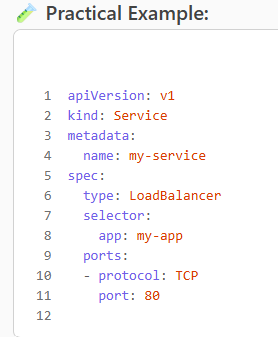
This exposes your app running on port 8080 to the internet via port 80.
🚪 2. Ingress
👶 Layman’s Explanation:
Like a gatekeeper at a mall entrance who directs you to the right shop based on what you ask for.
💻 Technical Explanation:
- Ingress manages HTTP/S routing to multiple services.
- You can define rules like:
example.com/api → backend-serviceexample.com/web → frontend-service
- Requires an Ingress Controller (e.g., NGINX, AGIC).
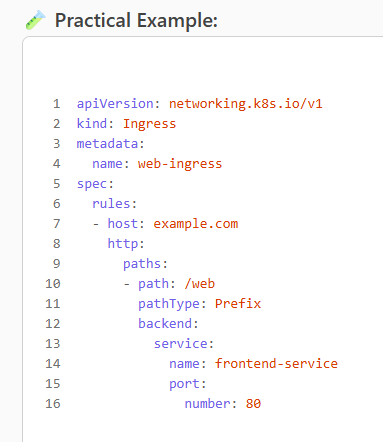
This routes traffic from example.com/web to your frontend service.
🔗 3. Endpoint
👶 Layman’s Explanation:
Like a contact list — it maps names to phone numbers (or IPs).
💻 Technical Explanation:
- Endpoints are automatically created by Services.
- They map the Service to the actual Pod IPs.
- You usually don’t manage these manually.
You’ll see the IPs of Pods that my-service is routing to.
4. NetworkPolicy
👶 Layman’s Explanation:
Like a security guard who decides which rooms (Pods) can talk to each other.
💻 Technical Explanation:
- Controls who can talk to whom inside the cluster.
- You can allow or block traffic between Pods based on labels, namespaces, ports.
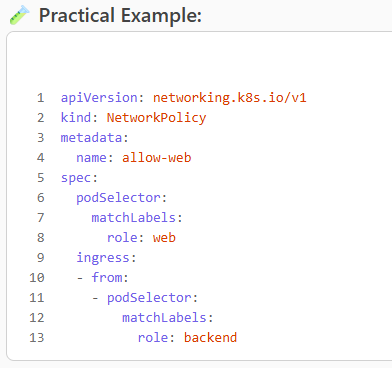
This allows only Pods with label role=backend to talk to role=web Pods.
Leave a Reply