Redis is like a super-fast notebook your computer uses to remember things temporarily. Imagine you’re working on a task and you jot down quick notes on a sticky pad — Redis is that sticky pad for your applications.
Redis is like a super-fast memory box for your app. Instead of going to a slow database every time, your app can quickly grab data from Redis — like grabbing a sticky note instead of opening a file cabinet.
- It helps apps remember things quickly.
- It’s used when you need speed and temporary memory.
- It’s like a shortcut to avoid repeating slow tasks.
🧑💻 In Technical Terms:
Redis (Remote Dictionary Server) is an in-memory data store that supports:
- Key-value storage
- Caching
- Pub/Sub messaging
- Session management
- Real-time analytics
It stores data in RAM, making it extremely fast compared to databases that store data on disk.
✅ Why Do We Use Redis?
| Use Case | Benefit |
|---|---|
| Caching | Speeds up apps by storing frequently accessed data |
| Session Storage | Keeps user login sessions fast and scalable |
| Rate Limiting | Prevents abuse by tracking requests per user |
| Queue Management | Handles background jobs and tasks efficiently |
| Real-time Data | Powers dashboards, chat apps, and live feeds |
How to Create/Run Redis
Using docker – docker run –name redis-server -p 6379:6379 -d redis
On Ubuntu
sudo apt update
sudo apt install redis-server
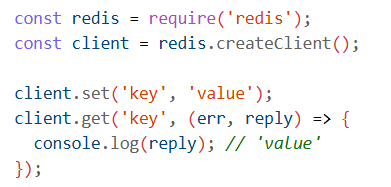
Connect to Redis
In Node.js, for example:
🚀 How to Use Redis in AKS (Azure Kubernetes Service)
You can deploy Redis in AKS in two main ways:
1. Using Azure Cache for Redis
- Create a Redis instance in Azure.
- Use Managed Identity to securely connect from AKS.
- Configure your AKS workload to use Redis credentials.
- Use
DefaultAzureCredentialin your app to authenticate. [Tutorial:…Azure …]
2. Using Redis Helm Chart
- Install Redis directly in AKS using Helm:

Connect using redis-cli or from your app via service name and port.
Leave a Reply