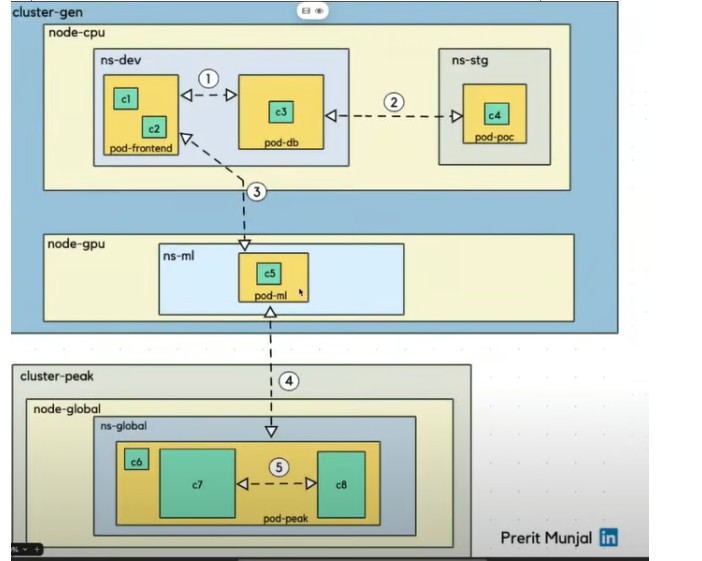
1. Pod-to-Pod Communication (Same Namespace, Same Node)
From c1/c2 → c3 (ns-dev on node-cpu)
- All pods are in the same namespace (ns-dev) and on the same node (node-cpu).
- Communication type: Direct pod-to-pod using pod IP or via ClusterIP Service.
Mechanism: Pods on the same node communicate via the virtual network interface provided by the container runtime (usually containerd). Network: They share the same Kubernetes CNI (Container Network Interface) plugin (e.g., Azure CNI or Kubenet). Access: You can use the pod’s IP address directly or communicate via services if abstraction is needed. Example: Pod A can curl Pod B using its internal IP.
2. Pod-to-Pod Communication (Different Namespace, Same Node)
- From c3 (ns-dev) → c4 (ns-stg)
- Different namespaces but same node.
- Communication type: Via ClusterIP Service.
How it works:- Cross-namespace service access: pod-poc.ns-stg.svc.cluster.local
3. Pod-to-Pod Communication (Different Namespace, Different Node in Same Cluster)
- From ns-dev (node-cpu) → ns-ml (node-gpu)
- Different namespace and node, same cluster (cluster-gen).
- Communication type: Cluster-level pod-to-pod via CNI and kube-proxy.
- How it works:
- CNI manages networking across nodes.
- DNS + kube-proxy ensures service IP routing.
- Inter-node communication uses underlay or overlay networking.
Networking Layer
- AKS uses Azure CNI or Kubenet to assign IPs to pods.
- Pods across nodes and namespaces can communicate using pod IPs or Kubernetes Services.
- The cluster DNS (
kube-dnsorCoreDNS) resolves service names across namespaces.
🧪 Example Scenario
Let’s say:
- Pod A is in namespace
frontendon Node 1. - Pod B is in namespace
backendon Node 2.
You can:
- Expose Pod B via a
ClusterIPservice inbackend. - Pod A accesses it using:
http://backend-service.backend.svc.cluster.local
Pod-to-Pod communication across different namespaces and nodes in the same AKS cluster, you don’t need to create anything extra unless you have specific restrictions in place like Network Policies or RBAC rules.
What’s Available by Default
- Pod IP communication: Pods can reach each other using their IPs, regardless of namespace or node.
- DNS-based service discovery: You can access services across namespaces using:
http://<service-name>.<namespace>.svc.cluster.local - Cross-node routing: Kubernetes handles routing between nodes automatically using the CNI plugin (Azure CNI or Kubenet).
Optional: Create a Service for Stable Access
Even though pods can talk via IP, it’s better to expose them via a ClusterIP service for stability and DNS resolution.
apiVersion: v1
kind: Service
metadata:
name: backend-service
namespace: backend
spec:
selector:
app: backend
ports:
– protocol: TCP
port: 80
targetPort: 8080
Then access it from another namespace like:
curl http://backend-service.backend.svc.cluster.local
Cross-Cluster Pod Communication (Different Cluster)
For cross-cluster pod communication in AKS (Azure Kubernetes Service), where pods in Cluster A need to talk to pods in Cluster B, Kubernetes doesn’t support this natively out-of-the-box. However, there are several production-grade approaches to enable this securely and reliably.
Submariner (Best for Pod-to-Pod Communication)
- Purpose: Enables direct pod-to-pod communication across clusters.
- How: Creates a secure tunnel between clusters and syncs service discovery.
- Use Case: Multi-cluster service mesh, hybrid cloud, or geo-distributed clusters.
2. Istio Multi-Cluster (Service Mesh)
- Purpose: Enables secure service-to-service communication across clusters.
- How:
- Deploy Istio in both clusters.
- Configure multi-cluster mesh (either shared control plane or replicated).
- Use service entries and DNS resolution to route traffic.
- Use Case: Advanced traffic management, observability, and security.
3. VNet Peering / VPN Gateway
- Purpose: Connects the underlying Azure VNets of both clusters.
- How:
- Use VNet peering if clusters are in the same region.
- Use VPN Gateway or ExpressRoute for cross-region or hybrid setups.
- Use Case: Enables IP-level communication between clusters.
4. API Gateway / Ingress Controller
- Purpose: Expose services from one cluster to another via HTTP(S).
- How:
- Use NGINX, Traefik, or Azure Application Gateway.
- Secure with TLS, authentication, and firewall rules.
- Use Case: When only specific services need to be exposed.
Intra-Pod Container Communication (Same Pod)
c7 ↔ c8 in pod-peak
- Same pod, different containers (sidecars or co-containers).
- Communication type: Localhost communication via localhost:port.
- How it works:
- Containers share the same network namespace.
- Example: curl http://localhost:8080 between containers.
Leave a Reply