Kubernetes is just set of controller where every controller have other controller.
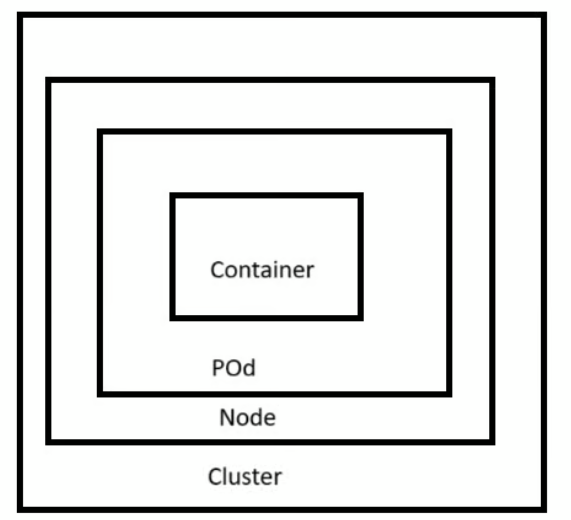
In kubernetes container present in pod , pod in node and node in cluster.
Etcd in kubernetes talk with other using protocol Grpc and rest.
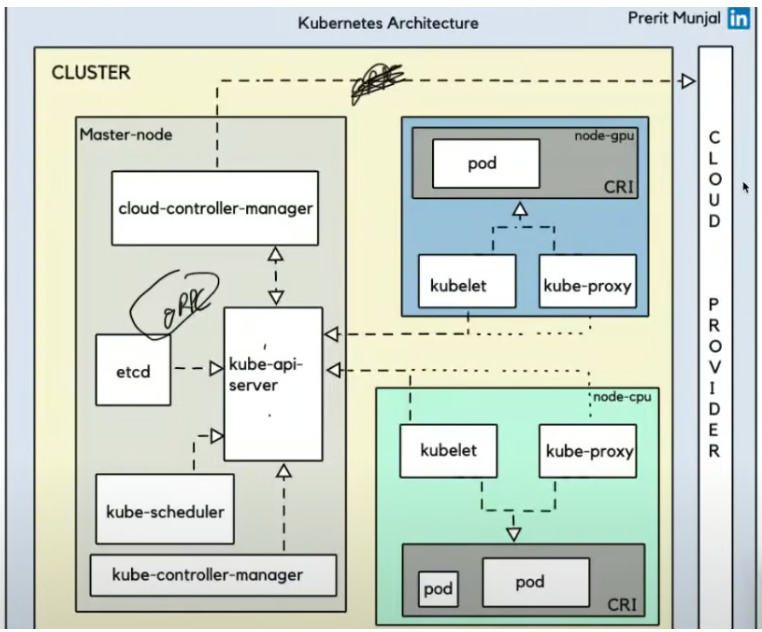
What are the main components of Kubernetes architecture?
A: Kubernetes architecture is divided into two main parts:
- Control Plane (Master Components)
- Data Plane (Worker Node Components)
There are 4 component of master plane.
1 – ETCD
2 – Kube scheduler
3 – Kube controller manager
4 – Kube Api server
Kubeapi server is most important part, if it goes down then you cant do any work in whole cluster.
What are the components in the Control Plane?
A: The Control Plane (Master) components include:
Allows cloud vendors to integrate their platforms with Kubernetes
API Server:
The heart of Kubernetes
Receives all requests from users and other components
Exposes the Kubernetes API for external interaction
Scheduler:
Decides where to place pods (on which nodes)
Considers resource requirements, constraints, and availability
etcd:
Key-value store database
Stores all cluster data and configuration
Acts as the “backup” for all cluster information
Controller Manager:
Runs controller processes (like ReplicaSet controller)
Ensures the desired state of the cluster is maintained
Manages the lifecycle of different controllers
Cloud Controller Manager (CCM):
Interfaces with cloud provider APIs
Optional component needed only when running in cloud environments
Q: If my master node stops working, will my application also stop running?
Yes, the application will keep running even if the master node goes down. This is because your application runs on worker nodes (also called user nodes), not on the master node. However, if the master node is down, you won’t be able to perform operations like scaling, updating, or deploying new applications until it is back up.
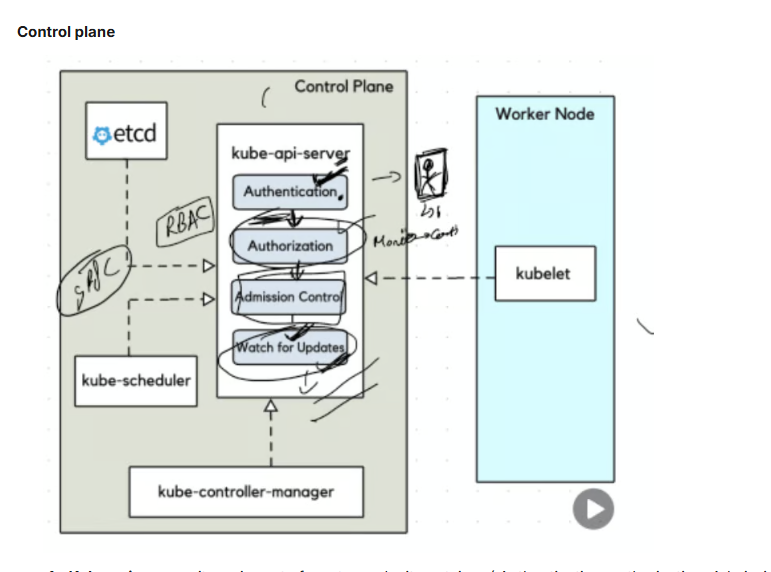
1 – Kube api server – its main part of master node. it container ( Authentication, authorization, Admission control and watch for update)
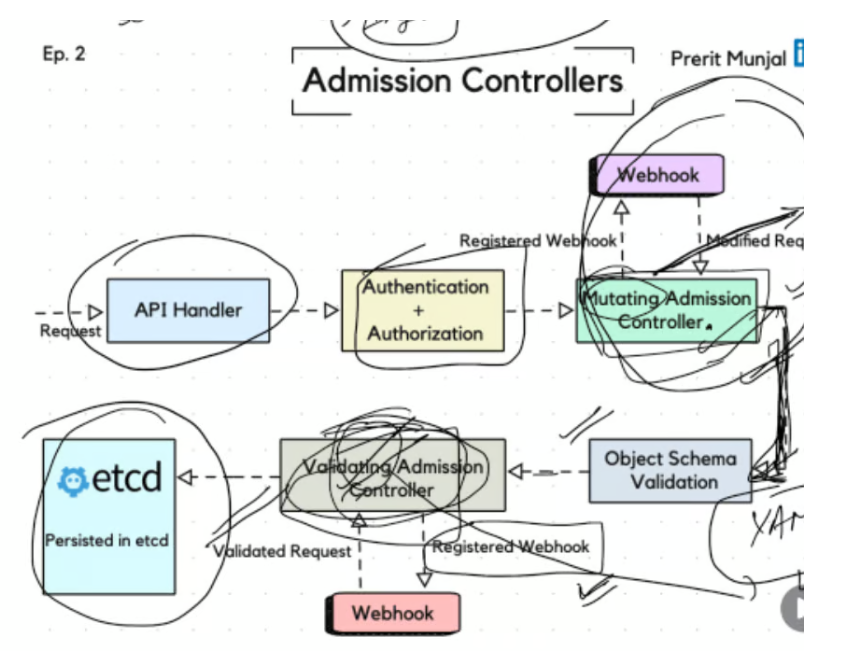
Admission control is just validating yaml manifest file and also mutating data like change automatically add or change fields (e.g., set default values) or add default labels for pod or add sidecar container with main container.
2 . ETCD
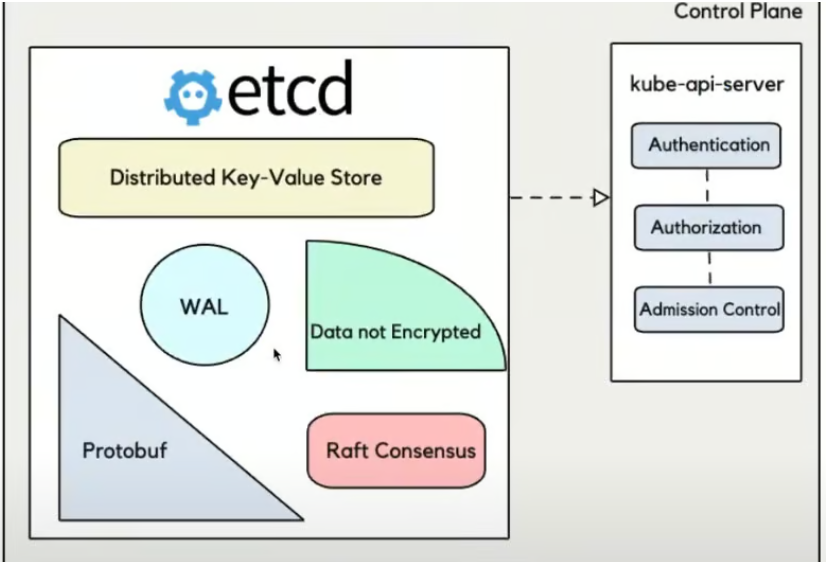
- etcd is a highly available key-value store.
- It stores the entire state of the Kubernetes cluster.
- If something is in your cluster (pod, service, config, etc.) — it’s stored in etcd.
If etcd goes down or is corrupted, your cluster can’t function properly. - Think of it as the brain of Kubernetes.
- But in AKS, Microsoft handles backups, HA, and health of etcd — so you don’t have to.
- Examples of Data Stored:
- Pods
- Nodes
- ConfigMaps
- Secrets
- Services
- Deployments
etcd in Kubernetes Architecture
Here’s how a typical API request works:
- You run a kubectl command (e.g., kubectl create pod)
- The request goes to the API Server
- The API Server:
- Authenticates and authorizes the request
- Passes it through admission controllers
- Writes the configuration/state into etcd
- Kubernetes controllers and schedulers watch etcd for changes and act accordingly (e.g., assign a pod to a node).
How many nodes should we choose?
It depends on what type of nodes you’re referring to:
1. Worker Nodes (where your application runs):
- No requirement for odd numbers
- You can have any number (2, 3, 5, 10, etc.)
- Depends on:
- Expected load
- Resource needs (CPU, memory, storage)
- High availability (run across zones)
- Budget
👉 Example:
If your app needs 4 vCPUs and 8GB RAM to handle normal load, and you want redundancy, you might choose 3 worker nodes, each capable of running the app, to ensure availability even if one goes down.
2. Control Plane Nodes (etcd / master nodes):
✅ Odd number is recommended here, and this is the key part of your question.
Why an odd number of control plane nodes (etcd)?
Reason: Quorum in Distributed Systems
- etcd uses Raft consensus algorithm
- To make decisions (like writing data), a majority (quorum) of nodes must agree
- This ensures consistency and avoids split-brain problems
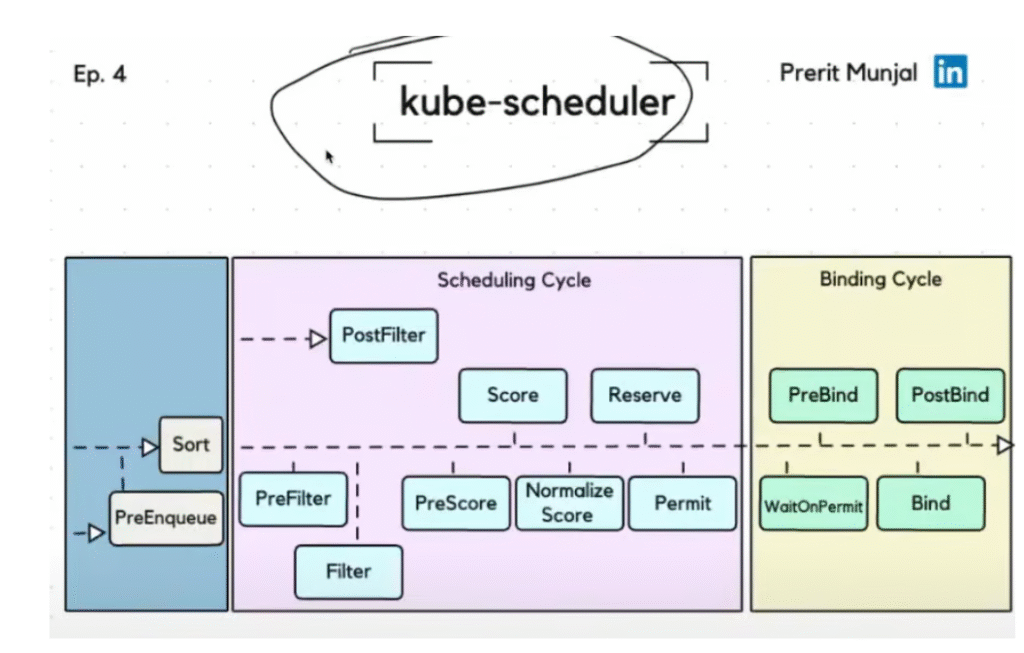
Kube scheduler
Choose best node for our pod.
Check any toleration are there are not or any size issue with node like pod is big size then which all node we can choose to schedule .
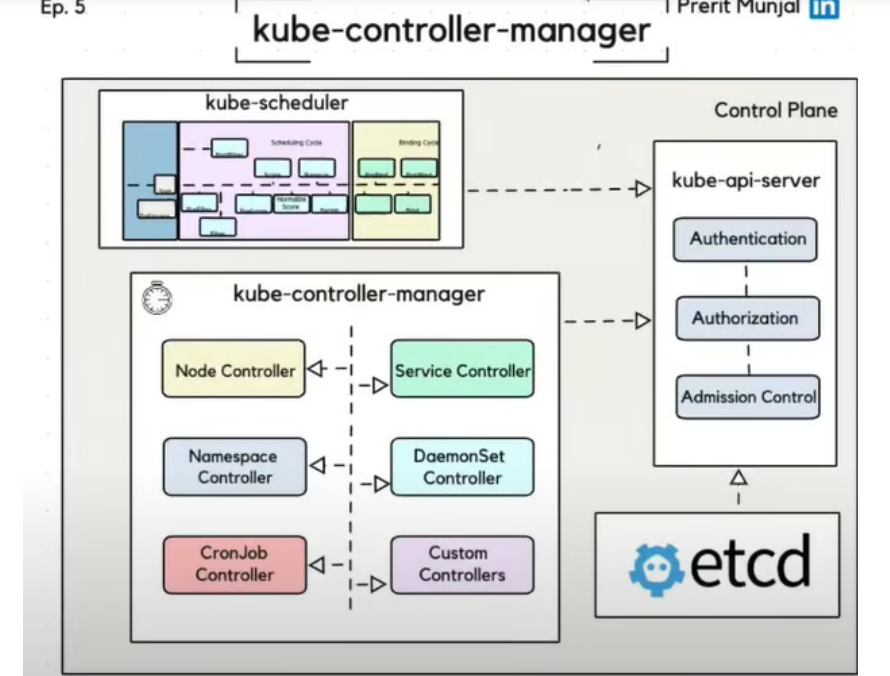
Kube Controller-manager
This component make sure state define and current state is same.
What are the components in the Data Plane?
A: The Data Plane (Worker Node) components include:
- Kubelet:
- Ensures pods are running on the node
- Communicates with the API server
- Responsible for maintaining pod lifecycle
- Kube-proxy:
- Manages network rules on nodes
- Handles pod networking and IP allocation
- Provides basic load balancing for services
- Container Runtime:
- Executes containers (Docker, containerd, CRI-O, etc.)
- Kubernetes supports any runtime that implements the Container Runtime Interface (CRI)
Worker node
1 – Kubelet
What does kubelet do in AKS (Azure Kubernetes Service)?
In AKS, kubelet:
- Runs on every node (VM).
- Talks to the Kubernetes API Server to get instructions. it use to connect continue with API server.
- Make sure to run container. manage container and pod.
- Makes sure the node is doing its assigned job (running Pods correctly).
- Automatically installed and managed by Azure as part of the AKS node setup.
Kubelet also run as Damon and run on every worker node.
Kubelet also run as Damon and run on every worker node.
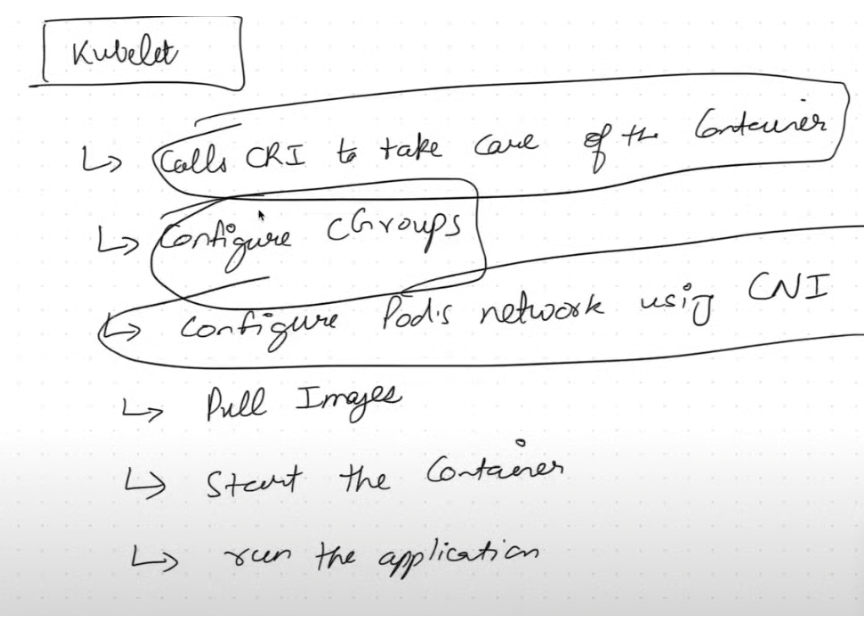
- Docker and containerD ( high level container runtime) call to runc (low level container run time) and runc actual create contianer.
2 – Kubeproxy
Installed in all worker node and it run as damaon set( running in background)
kube-proxy is a small networking component in Kubernetes that:
🔁 Forwards network traffic to the right Pod (container).
📦 Imagine a receptionist in an office: when someone comes in and asks for a person (say, the “web team”), the receptionist checks where that person is and directs the visitor there.
In Kubernetes, services are names (like my-app-service) and kube-proxy finds the right Pod(s) that match that name and forwards the traffic.
What does kube-proxy do in AKS (Azure Kubernetes Service)?
In AKS, kube-proxy:
- Runs on every node in the cluster.
- Handles network rules (iptables or IPVS) to make sure traffic reaches the right Pod.
- Ensures load balancing between multiple Pods of the same service.
- Works automatically and is managed by Azure, so you usually don’t need to configure it yourself.
kube-proxy Routes traffic between services and pods using iptables/IPVS.
CNI plugin Assigns IPs and creates network interfaces for each pod.
How do all these components work together?
A: Let’s understand how these components work together when you create a pod:
- A user sends a request to create a pod to the API Server
- The API Server validates the request and stores the pod information in etcd
- The Scheduler identifies which node should run the pod
- The API Server communicates this decision to the Kubelet on the chosen node
- The Kubelet instructs the Container Runtime to create and run the containers
- The Kube-proxy sets up networking for the pod
- The Controller Manager ensures the pod maintains its desired state
If the pod fails or the node goes down, Kubernetes automatically reschedules it to maintain the desired state.
🧪 Scenario
You have a Kubernetes cluster running on AKS with:
- A Service called my-service.
- Two Pods behind that service: pod-a and pod-b.
- You’re using Azure CNI.
📦 Step-by-step Flow
🧩 Step 1: Pod is created
- CNI Plugin (Azure CNI) kicks in.
- Assigns a real VNet IP to the Pod (e.g., 10.240.0.4).
- Creates the network interface in Azure.
- Connects the Pod to the Azure Virtual Network.
➡️ CNI ensures the Pod is reachable on the network.
🛣️ Step 2: Service is created
- A ClusterIP service (my-service) is created.
- Gets an internal IP, e.g., 10.0.0.10.
➡️ This IP is not a Pod IP, but a virtual IP used to front multiple Pods.
🔄 Step 3: kube-proxy sets up rules
- kube-proxy sees the new service and the list of Pods (Endpoints).
- It adds iptables rules:
- Any traffic to 10.0.0.10 will be load balanced to:
- 10.240.0.4 (pod-a)
- 10.240.0.5 (pod-b)
- Any traffic to 10.0.0.10 will be load balanced to:
➡️ kube-proxy ensures that traffic to the service reaches a healthy Pod.
Leave a Reply